Funnel Analysis for Claude
See which ads end up as deals.
This is the report I build for my B2B clients, packaged as a skill you run in your own Claude. You export your ad data and your HubSpot deals, and Claude builds a report that follows every company from the first ad impression to deal and closed won.
One-time payment, no subscription. Runs in Claude Code and the Claude app. No API keys, developer apps or hosting.
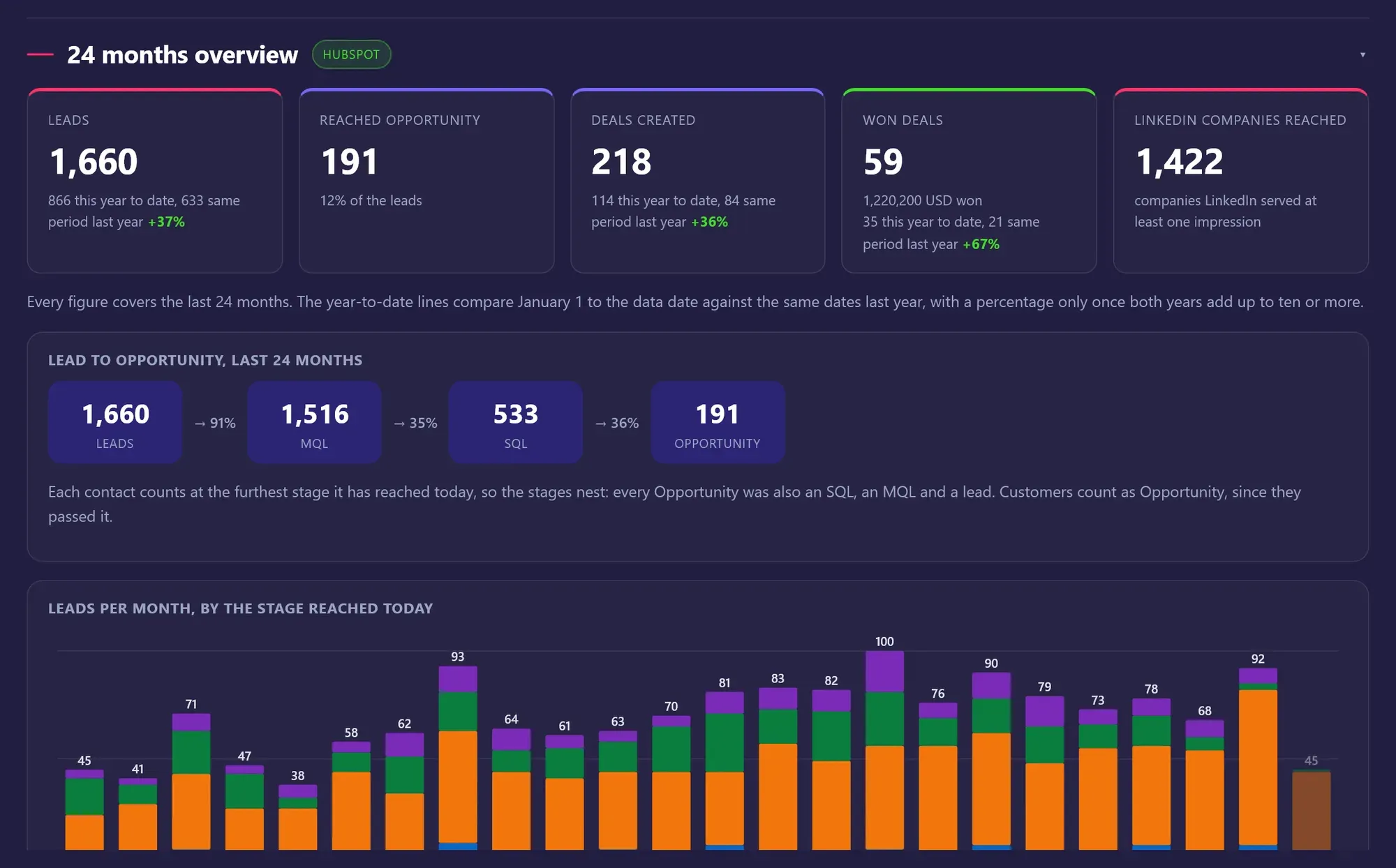
Leads, MQLs, SQLs and opportunities over two years, deals created and won, and how many companies LinkedIn reached. This year is compared with the same dates last year.
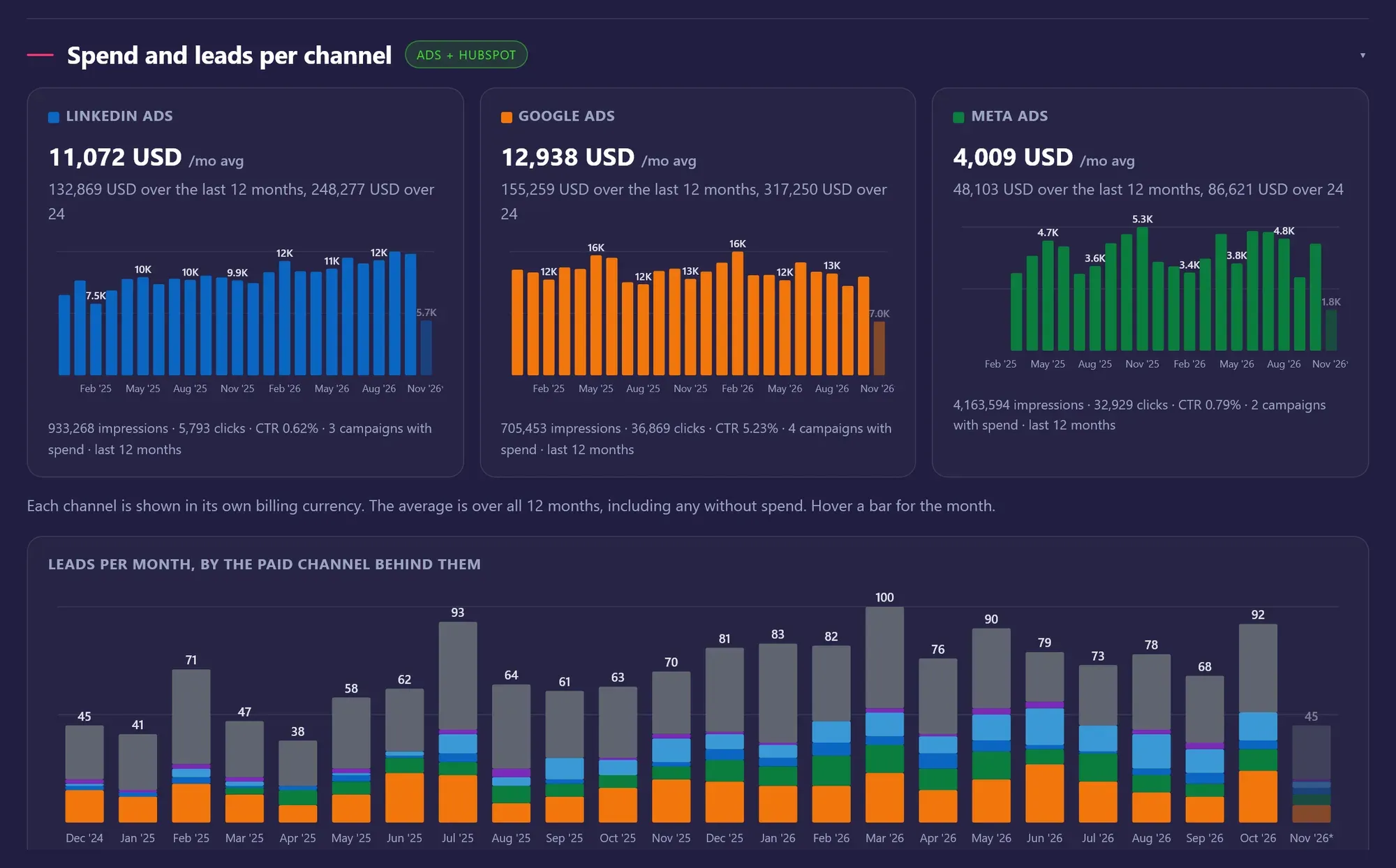
Spend per channel and month next to the leads each channel brought in. The same section shows your cost per lead, MQL, SQL and opportunity.
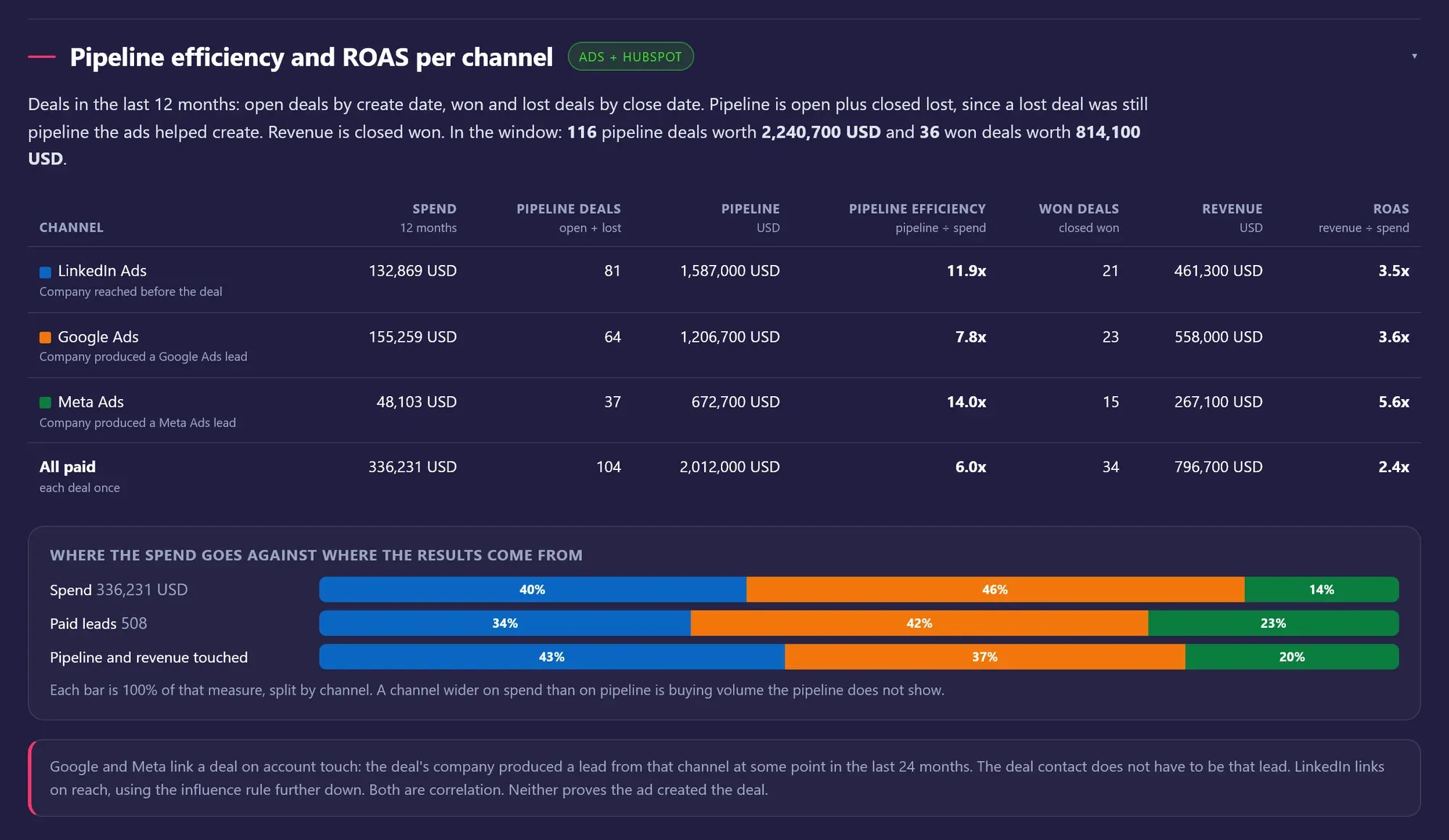
Pipeline efficiency and ROAS per channel over the last 12 months, and whether a channel takes a bigger share of the spend than of the pipeline.
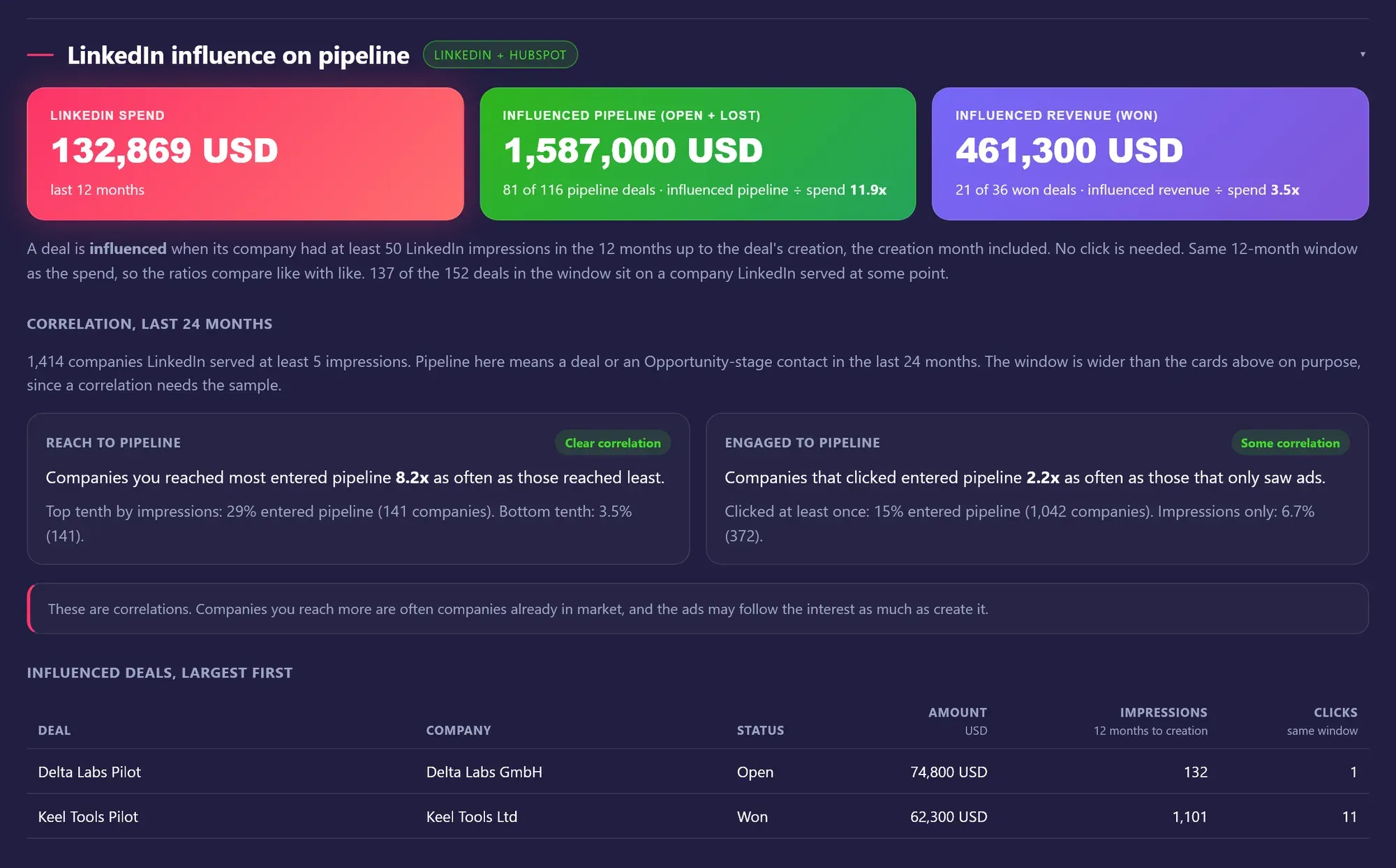
LinkedIn reach matched with your deals on company level. You see the pipeline and revenue from companies LinkedIn reached before the deal was created, and how much more often the companies you reach most end up in pipeline.
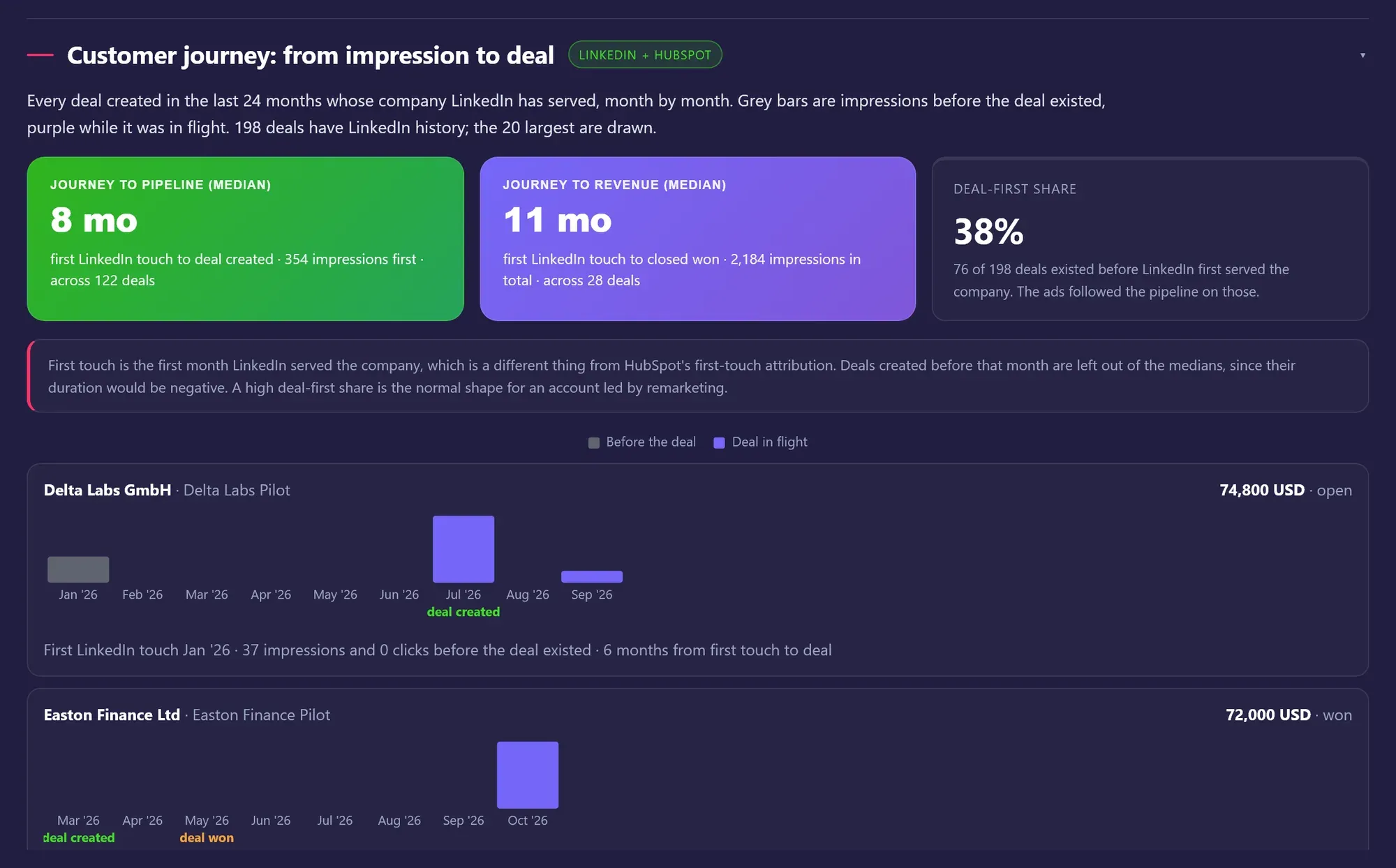
Every deal month by month, with the LinkedIn impressions before and after it was created. Here you see how long it usually takes from the first ad to a deal.
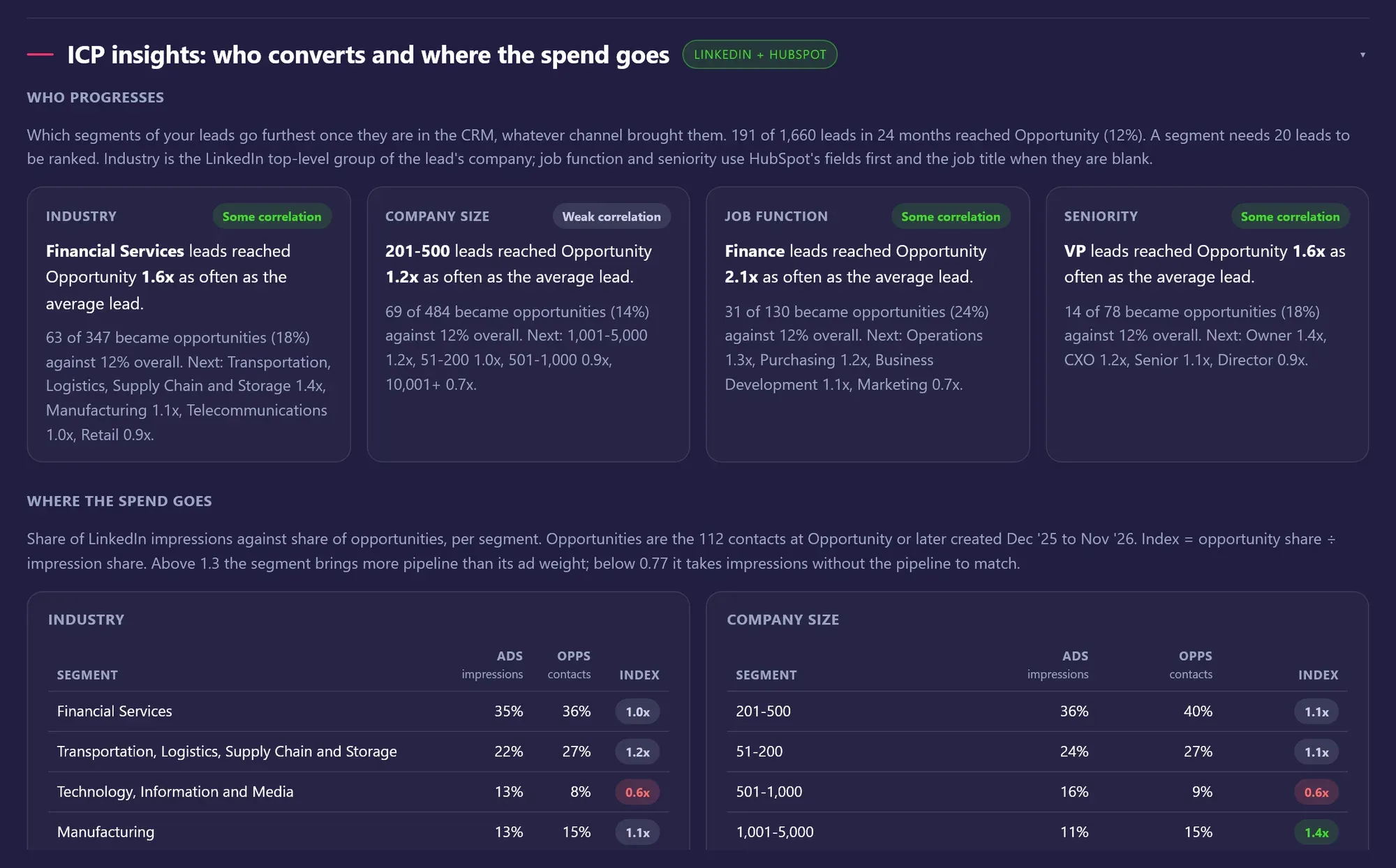
Which industries, company sizes, functions and seniorities turn into opportunities, next to where LinkedIn spends your impressions. Every row is a targeting setting, so a finding turns straight into a campaign change.
From the example report that comes with the skill. Acme Inc. and every number in it are made up.
How it works
From exports to report in one chat.
-
Install the skill
Upload the zip in the Claude app, or copy the folder into your skills folder in Claude Code. Then ask Claude to run the installation check.
-
Export your data
Export monthly reports from LinkedIn Campaign Manager, Google Ads and Meta, and your contacts, companies and deals from HubSpot. The guide shows how to export each file, and you can leave out a channel you don't run.
-
Ask Claude for the report
Claude lists what it found, asks about anything unclear, like your currency, and builds one HTML file you open in your browser. Every number is checked before the report is written, and if something doesn't add up, Claude stops and tells you what to fix.
What you get
- The skill for Claude Code, and the same skill zipped for the Claude app.
- Example data for a made-up company, so you can build a report before you export anything of your own.
- An example report to open first.
- A setup guide for every export from LinkedIn, Google Ads, Meta and HubSpot.
- A license for use in one company.
What you need
- Claude: Pro, Max, Team or Enterprise, with code execution turned on. Claude Code works on the same plans.
- HubSpot: CSV exports, or Claude's HubSpot connector if your portal is small.
- Ad data: CSV exports from LinkedIn Campaign Manager, Google Ads and Meta. Leave out a channel you don't run, and the report shows what the data supports.
- No setup: no API keys, developer apps or hosting.
Your data stays with you
The skill runs in your own Claude account and reads only the files you give it. Its scripts make no network calls, and nothing is sent to me. The report never shows contact names or email addresses.
Before you buy
Good to know.
How is LinkedIn matched with HubSpot?
LinkedIn's company export has names but no websites, so the skill matches on company name and HubSpot domain. A company that goes by a different name in LinkedIn and HubSpot is missed, which makes the LinkedIn figures a floor. You can add a match list for the companies that matter most.
How many files do I need to export?
LinkedIn's company export has no month split, so you export one file per month, at least 13 and preferably 24. On top of that come four LinkedIn demographics files for the ICP comparison, a monthly campaign report from LinkedIn, Google Ads and Meta, and your contacts, companies and deals from HubSpot. The first round takes a while, and the guide walks you through every file.
Can I use Claude's HubSpot connector instead of exports?
Yes, for smaller portals with up to about 1,500 leads and 500 deals. Above that the skill asks for CSV exports, since every record would otherwise go through the conversation.
Does it work with another CRM?
This version is built for HubSpot.
Can I run it for several markets?
One report covers one market. Filter the exports to that market and run the skill once per market.
How is this different from the report you build for clients?
For my clients the report is built on live data from the ad platforms and HubSpot, and it goes further, with share of search on Google and in AI answers, GA4, landing page audits, creatives and meeting notes. That version is included in all my plans.
From the blog
Guides on the same topic.
- Fix the Broken HubSpot Lead Attribution in 5 mins Declined cookie banners in the EU are messing up the Original Source attribution in HubSpot. This guide shows you how to recover paid attribution with one GTM tag, three form fields and one HubSpot workflow.
- Why European B2B Marketers Are Losing, and Why AI Is About to Make It Worse B2B advertising in Europe has become extremely difficult. At the same time, marketers are under heavy pressure from leadership to prove that ad spend ties back to revenue. The sources they turn to for help, the ad platforms, the US content creators, and now the AI models, are giving them advice that fits a different market than the one they actually work in.
- Easy Form Submission Tracking with Google Tag Manager Step-by-step form submission tracking with Google Tag Manager: pick the right method for your form, send the event to GA4 and Google Ads, and check that the numbers hold up.
Skill for Claude
Funnel Analysis for Claude
Run the report on your own exports, as often as you like. One-time payment, and the skill is yours to keep.