Google Ads Search Terms & N-gram Analysis
Find the search terms that eat your budget.
This is how I clean up search terms in my clients’ Google Ads accounts, packaged as a skill you run in your own Claude. You export your search terms, and Claude builds two negative keyword lists you can paste straight into Google Ads, plus an n-gram analysis that shows which words cost money without converting.
One-time payment, no subscription. Runs in Claude Code and the Claude app. No API keys, developer token or connection to your account.
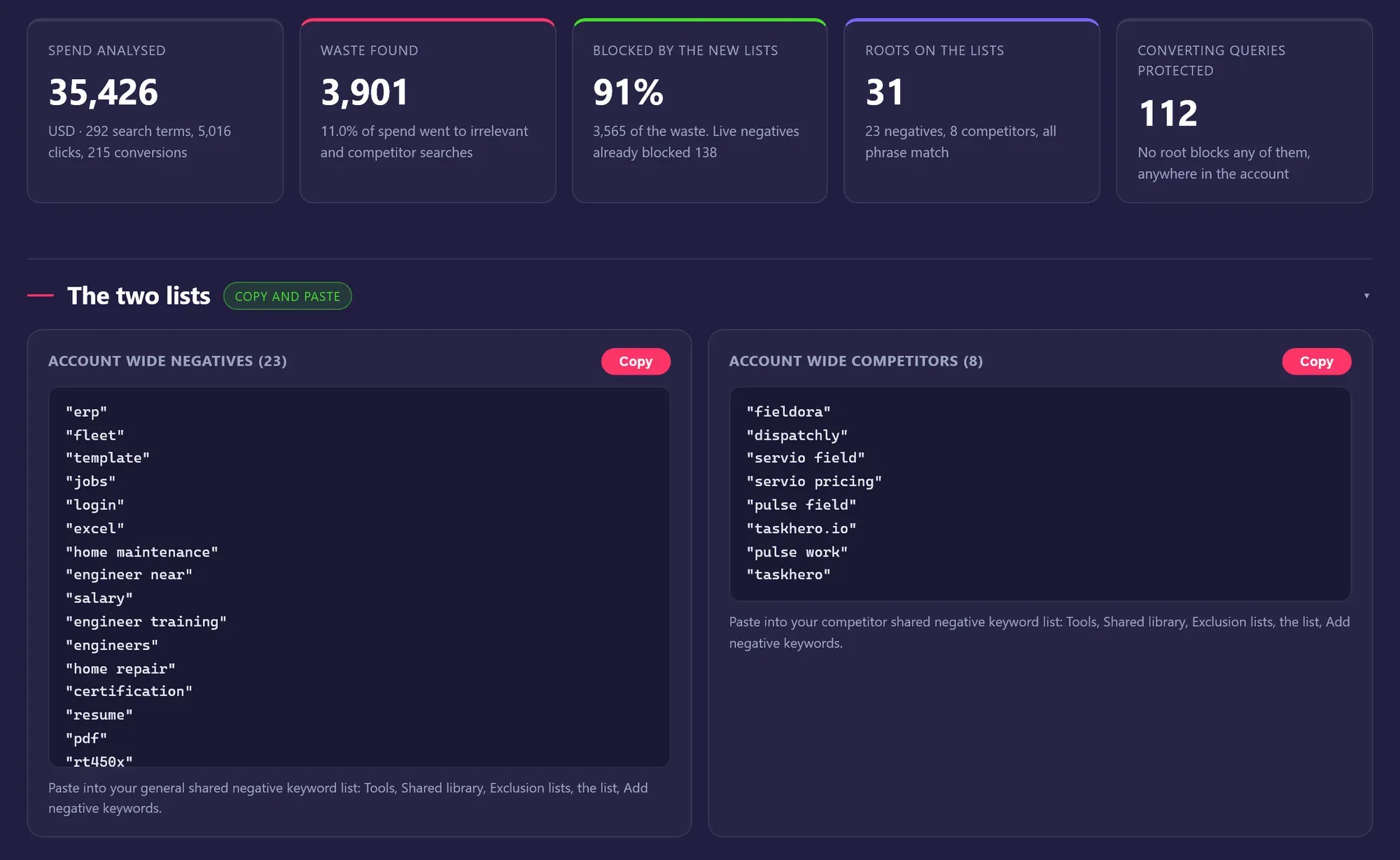
Two phrase match lists, ACCOUNT WIDE NEGATIVES and ACCOUNT WIDE COMPETITORS, ready to paste into your shared negative keyword lists. Above them you see how much of the waste they block.
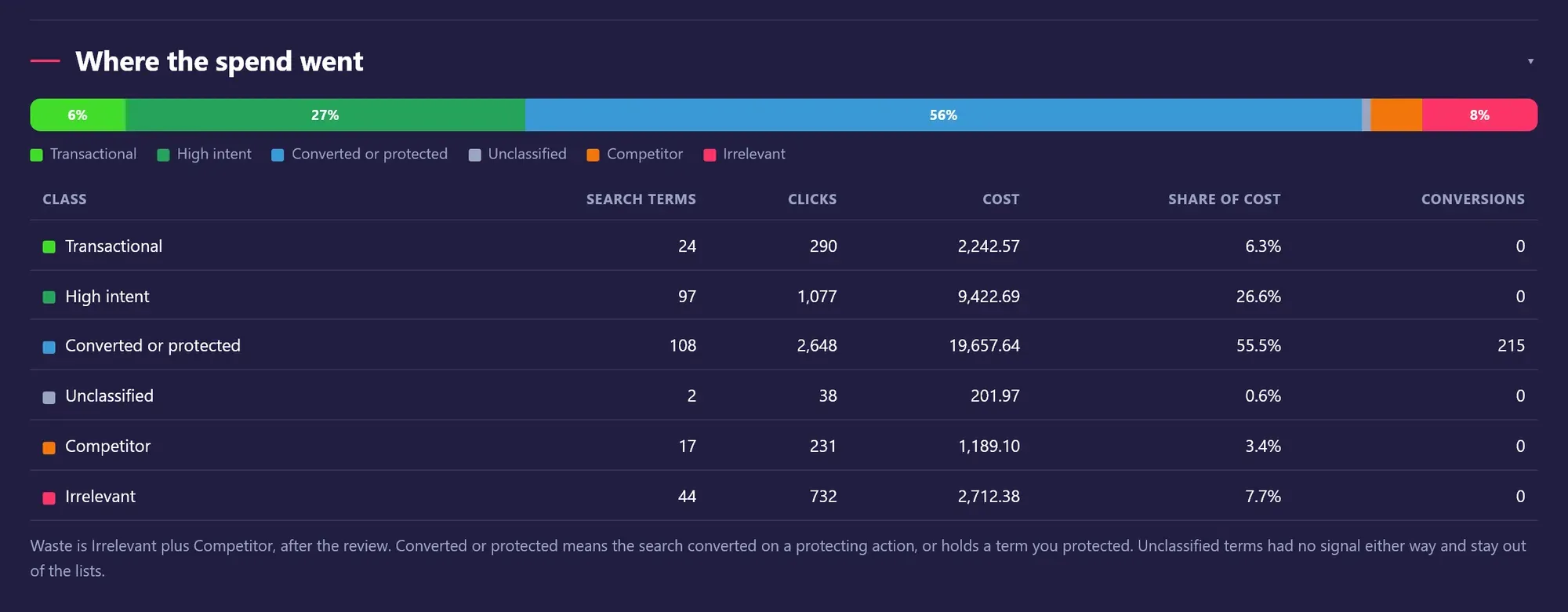
Your spend split into buying searches, research, competitors and irrelevant searches, so you see how much of the budget went to searches that were never going to become leads.
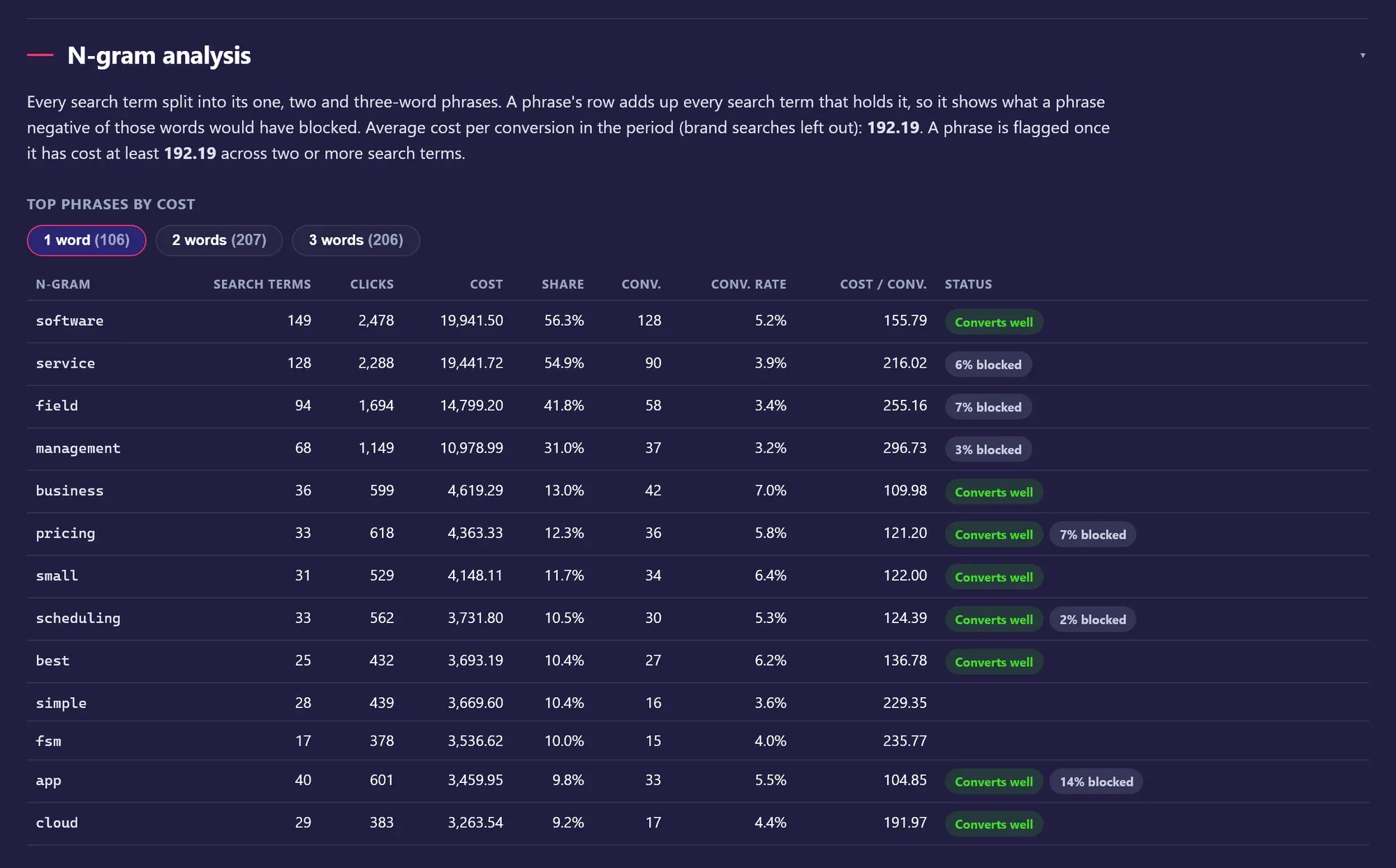
Cost, clicks, conversions and CPA for every one, two and three-word phrase. You see the phrases that cost money without converting, the ones that convert at twice your average CPA or more, and the words that convert well but that no keyword covers yet.
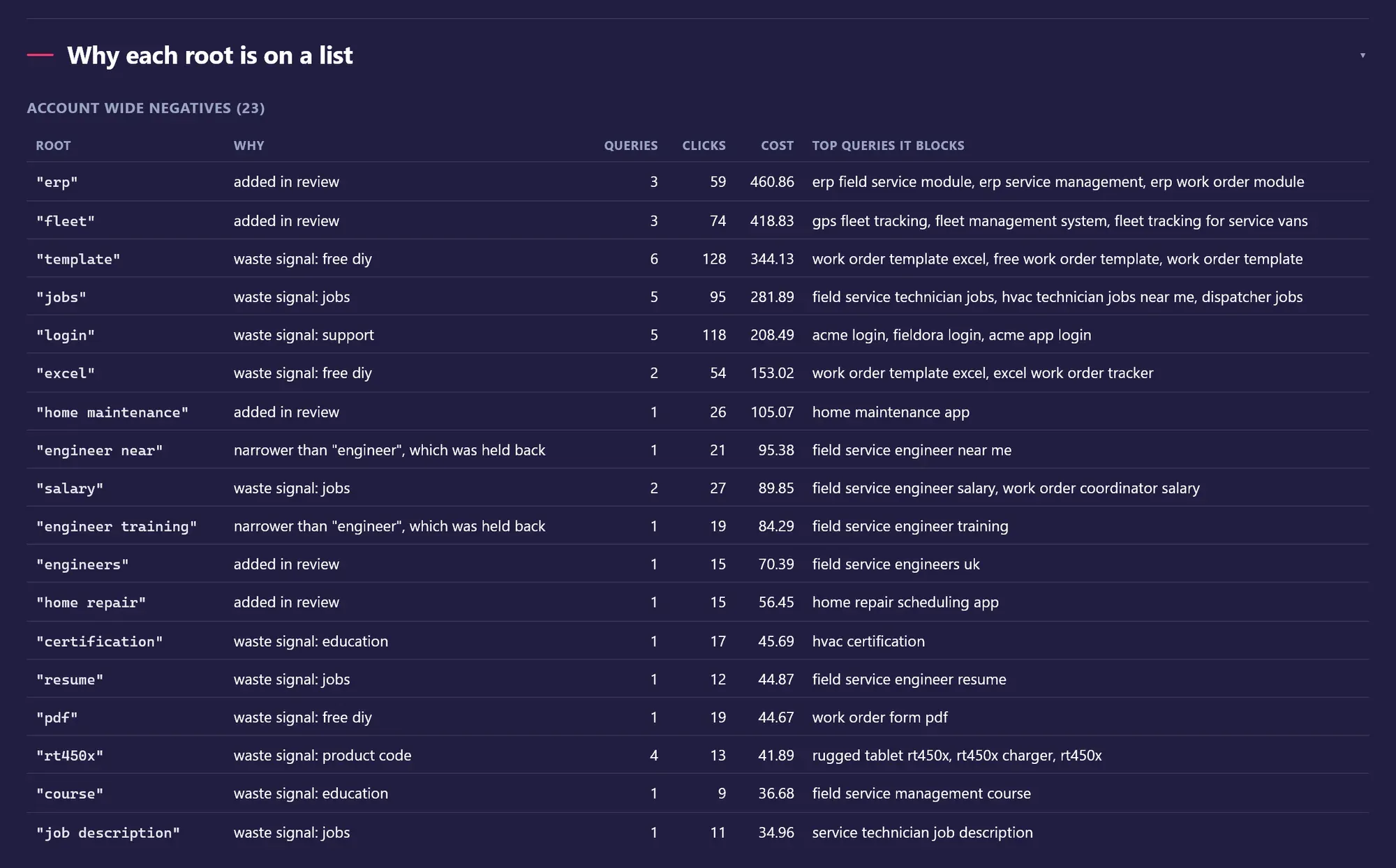
Every word on the lists with the reason it is there, the searches it blocks and what they cost, so you can check each one before you paste it in.
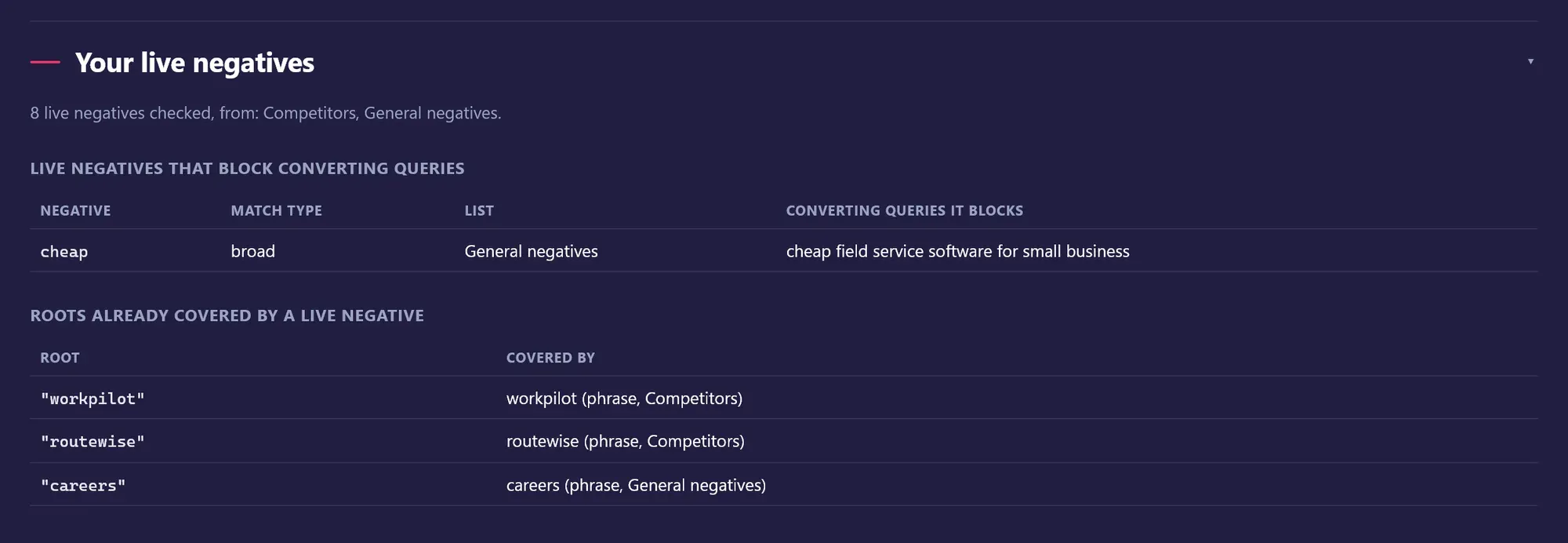
Your current negatives checked against the searches that converted. If one of them blocks leads today, you see it here.
From the example report that comes with the skill. Acme Inc. and every number in it are made up.
How it works
From search terms to clean lists in one chat.
-
Install the skill
Upload the zip in the Claude app, or copy the folder into your skills folder in Claude Code. Then ask Claude to run the installation check.
-
Export your search terms
Download the search terms report for the last 90 days from Google Ads. The guide also shows the exports that make the lists safer: 12 months of search terms per conversion action, your keywords and your current negative lists.
-
Ask Claude for the lists
The first time, Claude asks for your brand, the words you sell on, your competitors and which conversions are leads, and goes through the borderline searches with you. Then it writes the two lists and the report, and checks both lists again before anything is written.
What you get
- The skill for Claude Code, and the same skill zipped for the Claude app.
- Two lists in phrase match, as text files ready to paste into Google Ads.
- The report with the n-gram analysis, and every phrase in a CSV file.
- An example account with a finished report, so you see the result before you export anything.
- A license for use in one company.
What you need
- Claude: Pro, Max, Team or Enterprise, with code execution turned on. Claude Code works on the same plans.
- Google Ads: access to the account’s reports, so you can download them as CSV.
- Search campaigns: the lists are built for Search. Performance Max only uses the account-level negative keyword list.
- No setup: no API keys, developer token or connection to your account.
Your data stays with you
The skill runs in your own Claude account and reads only the files you give it. Its scripts make no network calls, and nothing is sent to me or to Google.
Before you buy
Good to know.
How do I know a negative won’t block leads?
No word reaches a list if it would block a search that brought a lead in the last 12 months, your brand, a word you sell on or one of your active keywords. You choose which conversion actions count as leads, and both lists are checked again before they are written.
Does it do everything on its own?
The skill sorts most searches with signal words, and Claude goes through the rest with you. The first run starts with a short dialog about your brand, your products and your competitors.
Which languages does it handle?
Signal words for English, Swedish, Norwegian, Danish, Finnish, German, Dutch and French, several at once. Other languages work with the English signals and a bit more review.
Does it work for Performance Max?
The lists are built for Search campaigns. Performance Max only takes the account-level negative keyword list, so add the words there if you want them to apply.
Why phrase match?
A phrase match negative blocks every search that holds its words in the same order, so one word covers many searches. Phrase match has no close variants, which is why the skill adds the forms people actually searched for.
How is this different from what you do for clients?
For my clients I go through search terms every month as part of running the account, straight in Google Ads. That is included in all my plans.
From the blog
Guides on the same topic.
- Google Ads: Essentials for Capturing Existing Demand Capturing demand is one of the most important concepts when it comes to B2B marketing. This article will walk you through how you can turn your Google Ads account into a full-blown lead machine.
- Google Ads: The Ideal Setup for B2Bs A step-by-step guide to setting up your Google Ads account and first Search campaigns for a B2B brand as cost-efficiently as possible, while still maximizing converting traffic. Updated for AI Max and the end of language targeting.
- Why European B2B Marketers Are Losing, and Why AI Is About to Make It Worse B2B advertising in Europe has become extremely difficult. At the same time, marketers are under heavy pressure from leadership to prove that ad spend ties back to revenue. The sources they turn to for help, the ad platforms, the US content creators, and now the AI models, are giving them advice that fits a different market than the one they actually work in.
- Easy Form Submission Tracking with Google Tag Manager Step-by-step form submission tracking with Google Tag Manager: pick the right method for your form, send the event to GA4 and Google Ads, and check that the numbers hold up.
Skill for Claude
Google Ads Search Terms & N-gram Analysis
Run it on your own account, as often as you like. One-time payment, and the skill is yours to keep.