 Alex Rangevik 15+ years in B2B marketing, web and coding
ChatGPT Ads Manager: How to Set Up Your First B2B Campaign
Start on engagement conversions and keep the campaign narrow until you've reached everyone in your category who's actually in the market.
Updated
The first thing I set up for a ChatGPT Ads campaign is a 90-second timer in Google Tag Manager, before I've even logged in to Ads Manager. A B2B account gets way too few leads for the algorithm to learn from, so the timer is what my first campaigns optimize for.
After that I keep the campaign narrow. Desktop only, one city at a time, and context hints written from the client's ICP.
TL;DR
Start with engagement conversions, keep an eye on bounce rate and session duration, and add an MQL goal in a copy of the campaign when you scale the budget.
- Before you open Ads Manager
- Set up the 90-second timer as the conversion
- The campaign settings I change
- Context hints written from your ICP
- Write the ad
- Tag every click with UTMs
- When to add MQLs and widen the campaign
Get the timer into GTM and send it to OpenAI as a Page viewed event before you create the campaign. You pick the conversion event when you build the campaign, and you can't swap it afterwards.
Before you open Ads Manager
Check which country your company is billed in. The country, currency and time zone can't be changed once the ad account exists, so a wrong pick means starting over with a new account.
The company that advertises has to be based in a country where Ads Manager is available, and the Nordics are on the list. Business verification can take up to seven business days, so start it a week before you want to launch.
Self-serve accounts pay by card after the fact. OpenAI charges the card when your unpaid spend hits a threshold and takes the rest at the end of the month. It's gone pretty smoothly for my clients so far.
Set up the 90-second timer as the conversion
I use a Timer trigger in Google Tag Manager that fires once, after 90 seconds on the site, the same timer I use as a conversion in Google Ads. In Ads Manager it's called "Engaged visit - 1m 30s".
Ads Manager only optimizes for standard events, so a custom event can't be the goal. I give the timer the event type Page viewed, and then it's there to pick in the campaign.
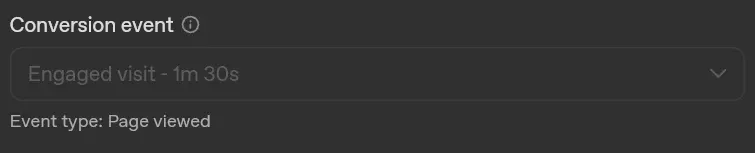
You create the data source under Conversions, Data Sources, and send the events through the OpenAI Pixel, the Conversions API or both. Then open the pixel's test mode and watch the event come in on the Event Stream. GTM saying the tag fired doesn't prove OpenAI got anything.
The campaign settings I change
| Setting | What I pick |
|---|---|
| Objective | Conversions, paid per click |
| Conversion event | Engaged visit - 1m 30s |
| Platforms | Desktop web only |
| Location | One city at a time |
| Creative enhancements | Off |
The objective is locked once the campaign is saved, and so is the conversion event. Start and end dates sometimes only show up after you've saved the campaign, but don't publish it just to get to them, since the ads can start running right away.
Creative enhancements is the one I always turn off. Since October 30, 2026 it's on by default for self-serve accounts, and it lets ChatGPT rewrite your headlines and descriptions, crop your images, translate the copy and send the click to another page on your site. You switch it off under Manage settings on the account or the campaign (at least it's one switch here and not 150 like in Meta 😅).
On budget, my tests run on about SEK 5,000 a month per market, which is roughly the minimum daily budget for one campaign. Ads Manager won't save a daily budget under €15 (or SEK 175, NOK 160 or DKK 110, depending on your billing currency), and it tells you in red the moment you type 14.
Context hints written from your ICP
I write the context hints from the client's ICP: who the customer is, the persona, how big the company is and the exact problems they have.
People write way more in an AI chat than in a Google search. One of my clients sells POS systems to restaurants. There, the conversation I want to show up in looks something like "I run a small restaurant with a revenue of X and Y employees, which POS system is good for us?" So the hints describe that restaurant owner, the size of the business and the problems they're trying to solve.
You put the hints on the ad group, and they describe where your ad fits without enforcing locations or exclusions. You also won't see which conversations triggered your ad sets or ads.
In Europe you can't lean on custom audiences either. Ads Manager says outright that they're not supported for campaigns that target the EEA or Switzerland, where personalized ads aren't available yet. So for a Nordic campaign, the context hints and the location are what you have to work with.
Write the ad
The headline says the product category, and the description goes from the pain points to the features that fix them. Keep it simple and clear.
The headline can be up to 50 characters, with 16 to 24 recommended, and the description up to 100, with 32 to 48 recommended. Images are 1200 × 1200 pixels for the square format or 1200 × 675 for the wide one.
Send the click to the page that matches what the ad promised and not to the homepage. That page also has to let OpenAI's crawler in, with no login or CAPTCHA in front of it, because every ad is reviewed before it goes live. If nothing is running after a day, check the status by hovering over Not serving.
Tag every click with UTMs
I put the same UTM template on every ad, so each visit in GA4 can be traced back to the campaign, ad group and ad.
utm_source=chatgpt&utm_medium=cpc&utm_campaign={campaign_id}&utm_term={ad_group_id}&utm_content={ad_id}&utm_id={campaign_id}That's where I keep an eye on bounce rate and session duration during the first weeks, next to the timer conversions in Ads Manager.
When to add MQLs and widen the campaign
When we scale up the budget, I duplicate the campaign and give the copy an MQL goal. The MQLs go back from HubSpot through the Conversions API, and since the conversion event is locked, a copy is the only way to change the goal.
Before you show your ads on mobile or loosen the context hints, make sure you've reached the whole in-market segment in your category, roughly 5% of your SAM.
Common questions
Can an agency run the account for us?
Share the ad account with the agency's organization in the Admin Console, under Global settings and Share access, using their Tenant ID. You decide whether they get Viewer or Admin access, and nobody has to share a login.
Why does ChatGPT traffic show up in GA4 before the ads are live?
Most likely that's OpenAI's review checking your landing page. Those visits can show up as paid traffic in analytics tools, but you're not billed for them.
Can HubSpot send leads to ChatGPT Ads?
HubSpot has its own ChatGPT Ads integration that works on every Marketing Hub tier. If you go through the Conversions API instead, it needs the pixel ID from the same data source.
Is there an API for ChatGPT Ads?
There is, and you create the keys under Settings, General, API Keys. I pull spend, clicks and impressions through it with one of my Claude skills, and OpenAI has its own plugin for ChatGPT and Codex that can build campaigns and compare results.
ChatGPT Ads facts checked against OpenAI Help in November 2026.
Tools from my client work

Related posts
-
 ChatGPT Ads
 Cost for B2B: What Our Tests Actually Cost
ChatGPT Ads look expensive on CPM, but per engaged visit they've cost way less than Meta and Google search in my B2B test. -
 ChatGPT Ads
 for B2B: What They Cost and Whether to Test Them
In B2B, ChatGPT Ads are really good at bringing engaged visitors, so I'd start testing them now while the platform is new. -
 LinkedIn Ads
 Audit: The Checklist I Run on Every Account
The big question in a LinkedIn audit is whether the money is spent right, and there are way more ways to get that wrong than right.