LinkedIn Video Ads for B2B: Length, Objective and What to Measure
How long I make LinkedIn video ads for B2B, how they work with the sound off, LinkedIn's video ad specs, why they go on the video views objective with a manual bid, and the numbers I judge them on.

LinkedIn recommends 15 to 30 seconds for video ads, so that they qualify for every placement in the feed and on Audience Network (LinkedIn Help, November 2026). I switch Audience Network off, and neither of the two lengths I use falls in that range.
A brand video for a cold audience and a video that explains the product need different lengths, and Erik Modig's scale further down shows why.
TL;DR
I make brand videos under 10 seconds and explainer videos 30 to 45 seconds, put them on the video views objective with a manual bid 10% under LinkedIn's suggestion, and judge them on completed views and the pool of people who watched 75% or more.
- Pick the length from what the video has to say
- Make the video work with the sound off
- LinkedIn video ad specs
- Video views costs the least per completed view
- Bid by hand to pay per view
- Judge it on completions and the 75% pool
Check that the product and the pain show in the first two seconds of every video you run.
Pick the length from what the video has to say
Erik Modig, a marketing researcher at the Stockholm School of Economics, sets the length of a video ad by what it has to do in Marketing Levels. His scale runs from one second to remind people to buy to 60 seconds to tell the story of your world.
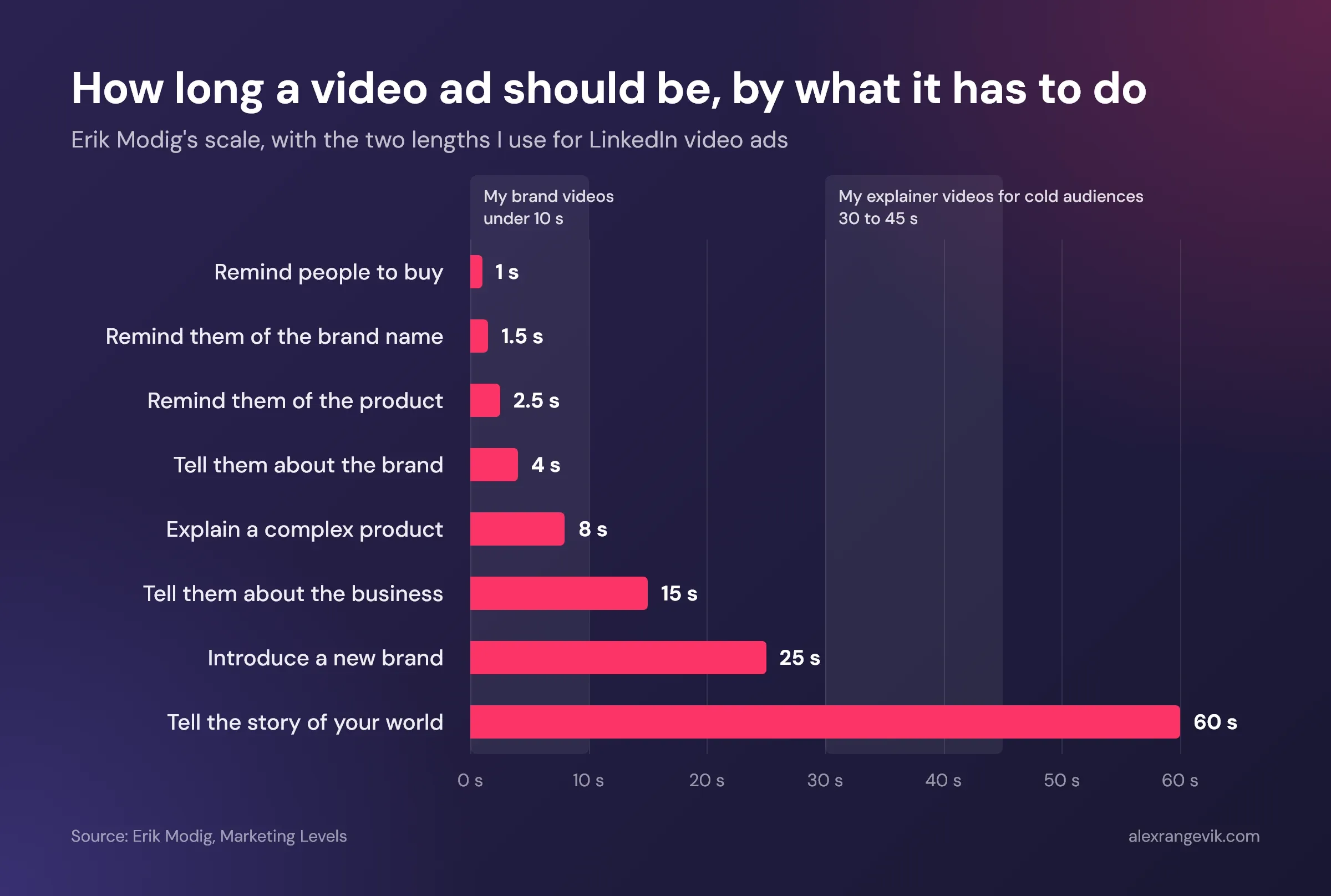
Modig puts explaining a complex product at 8 seconds. That's enough in warm remarketing, where people already know the product, and too short for a cold audience. My explainer videos for cold audiences run 30 to 45 seconds, and my brand videos stay under 10.
In LinkedIn's 2025 data, videos of 7 to 15 seconds got up to 300% higher completion rates, and longer videos got as many clicks and views as the short ones (LinkedIn, November 2026). A video under 30 seconds loops until it has played for 30 seconds.
The videos that work best in my B2B accounts are customer cases, product demos and experts or founders talking to the camera. A video posted from an expert's own profile can also run as a Thought Leader Ad.
Make the video work with the sound off
LinkedIn video ads play in the feed with the sound off until someone turns it on (LinkedIn, November 2026). My videos have the subtitles burned into the picture and a banner across the top with the hook in text. LinkedIn also takes subtitles as an SRT file, without custom formatting such as font colors.
The product and the pain come in the first two seconds, the brand shows in the first second, and the logo stays on screen for the whole video. I skip logo intros. LinkedIn's advice is to put the most important content in the first 10 seconds (LinkedIn Help, November 2026).
I make the videos square or 4:5, the same as my image ads.
LinkedIn video ad specs
Video ads are MP4 files from 3 seconds to 30 minutes and up to 500 MB, and LinkedIn recommends the 4:5 ratio at 720 × 900 pixels. The table has the rest, from LinkedIn's spec page in November 2026.
| Spec | LinkedIn's limit |
|---|---|
| Length | 3 seconds to 30 minutes, 15 to 30 seconds recommended |
| File | MP4, 75 KB to 500 MB, H.264 or VP8 video, AAC or MPEG4 audio, under 30 frames per second |
| Square, 1:1 | 360 × 360 to 1920 × 1920 |
| Vertical, 4:5 | 720 × 900 recommended, 360 × 450 to 1080 × 1350 |
| Vertical, 9:16 | 720 × 1280 recommended, 360 × 640 to 1080 × 1920 |
| Landscape, 16:9 | 1920 × 1080 or 1200 × 675 recommended, 640 × 360 to 1920 × 1080 |
| Captions | SRT file, no custom formatting |
| Thumbnail | JPG or PNG, up to 2 MB |
| Intro text | Cut off at 150 characters, 3,000 max |
| Headline | Cut off at 70 characters, 200 max |
You can upload up to 25 videos in 24 hours.
Video views costs the least per completed view
The video views objective only takes video ads, and it optimizes for views or impressions (LinkedIn Help, November 2026). Kiin Labs' 2026 benchmark, mostly from US-billed accounts, compared it with the other objectives on every sponsored video campaign in its panel, paired within each account (Kiin Labs, 2026).
Against brand awareness in 54 accounts, video views cost 18% less per view and 32% less per completed view. Against engagement in 90 accounts the cost per view was the same, and video views cost 25% less per completed view. Engagement bought reactions instead, and on video views the engagement rate was 78% lower and the landing page click-through rate 75% lower. Why I keep video off brand awareness is in my post on campaign objectives.
Compared across accounts, a view cost $0.072 on cold audiences over 100,000 people and $0.148 under 10,000. The Nordic cold audiences I run are 2,300 to 7,700 people, at the expensive end. Paired in 27 accounts, retargeting pools had a 13% higher view rate than cold audiences and a 37% higher landing page click-through rate, and in 44 accounts an uploaded list did no better than a cold audience.
Bid by hand to pay per view
I bid by hand on video views, because then I pay per view, two seconds of watching, instead of per impression. Maximum delivery and cost cap charge per impression on this objective (LinkedIn Help, November 2026). I start 10% under the bid LinkedIn suggests.
Kiin's data leans toward automatic bidding, which Kiin uses for its own video. In 29 accounts that ran both, automatic bidding got a 21% lower CPM than a manual cost per view bid and a 10% lower cost per view, a difference that wasn't significant. Where Kiin compared bid levels within 73 accounts, the campaign with the highest manual bid paid 90% more per view than the one with the lowest, for a view rate 4% higher.
Judge it on completions and the 75% pool
Campaign Manager reports plays, two-second views, how many viewers got to 25, 50 and 75% of the video, and completions at 97 to 100% (LinkedIn Help, November 2026). Since March 2025 the completion rate is completions divided by impressions, where it used to be divided by plays, so benchmarks published before then don't compare. Average watch time has data from January 6, 2026.
I judge a video on its completed views and on the pool of the people who watched 75% or more. The pool gets the ads that come after the video, which I go through in my post on LinkedIn retargeting, and LinkedIn can build video pools from 25, 50, 75 or 97% viewed (LinkedIn Help, November 2026).
How I make LinkedIn video ads
- Brand videos under 10 seconds, explainer videos for cold audiences 30 to 45 seconds.
- Subtitles burned in and a hook banner on top, with the brand in the first second and the logo on screen throughout.
- The product and the pain in the first two seconds, and no logo intro.
- Square or 4:5.
- The video views objective, with a manual bid 10% under LinkedIn's suggestion.
- Completed views and a pool from 75% viewed, and the pool gets the next ad.
Common questions
How long should a LinkedIn video ad be?
I keep brand videos under 10 seconds and explainer videos at 30 to 45, since a complex product takes longer to explain to a cold audience. LinkedIn recommends 15 to 30 seconds so the video can show in every placement, Audience Network included.
What are the specs for LinkedIn video ads?
MP4 files from 3 seconds to 30 minutes and up to 500 MB, in 1:1, 4:5, 9:16 or 16:9, with captions as an SRT file and a JPG or PNG thumbnail up to 2 MB. LinkedIn recommends 4:5 at 720 × 900 pixels.
How much does a LinkedIn video view cost?
In Kiin Labs' 2026 data, a company page video on the video views objective cost a median of $0.108 per view. Compared across accounts, cold audiences over 100,000 people paid $0.072 a view and audiences under 10,000 paid $0.148.
Do LinkedIn video ads play with sound?
They play in the feed with the sound off until the viewer turns it on, so the subtitles and the hook have to work on mute.
Pull the completed views for each video you ran last quarter and put them next to the size of its 75% pool.
Tools from my client work

Related posts
-
 LinkedIn Ads
LinkedIn Ad Fatigue in B2B: When to Turn an Ad Off and When to Refresh
How I spot ad fatigue on LinkedIn, the four conditions that turn an ad off, why I rotate ads evenly and refresh B2B creative every three months at the latest, and what I watch instead of cost per click. -
 LinkedIn Ads
LinkedIn Campaign Objectives for B2B: Which One to Pick and When
The LinkedIn campaign objectives I use in B2B accounts and when, from website visits and engagement to the ones I rarely touch, with Kiin Labs' paired data on brand awareness and engagement by audience size. -
 LinkedIn Ads
LinkedIn Conversation and Message Ads for B2B: Only to People Who Know You
How I use LinkedIn message ads and conversation ads in B2B: only to warm pools, starting with the people who engaged with a Thought Leader Ad, sent by the same person, with one clear ask and a high bid.